

SuperAPI<>ATO Connection Troubleshooting Guide
Introduction
Use this guide to troubleshoot connection failures between a SuperAPI employer and the ATO. Intended for software partners.
Troubleshooting: Employer & BAS/Tax Agent
Check the provider and SSID details are correct
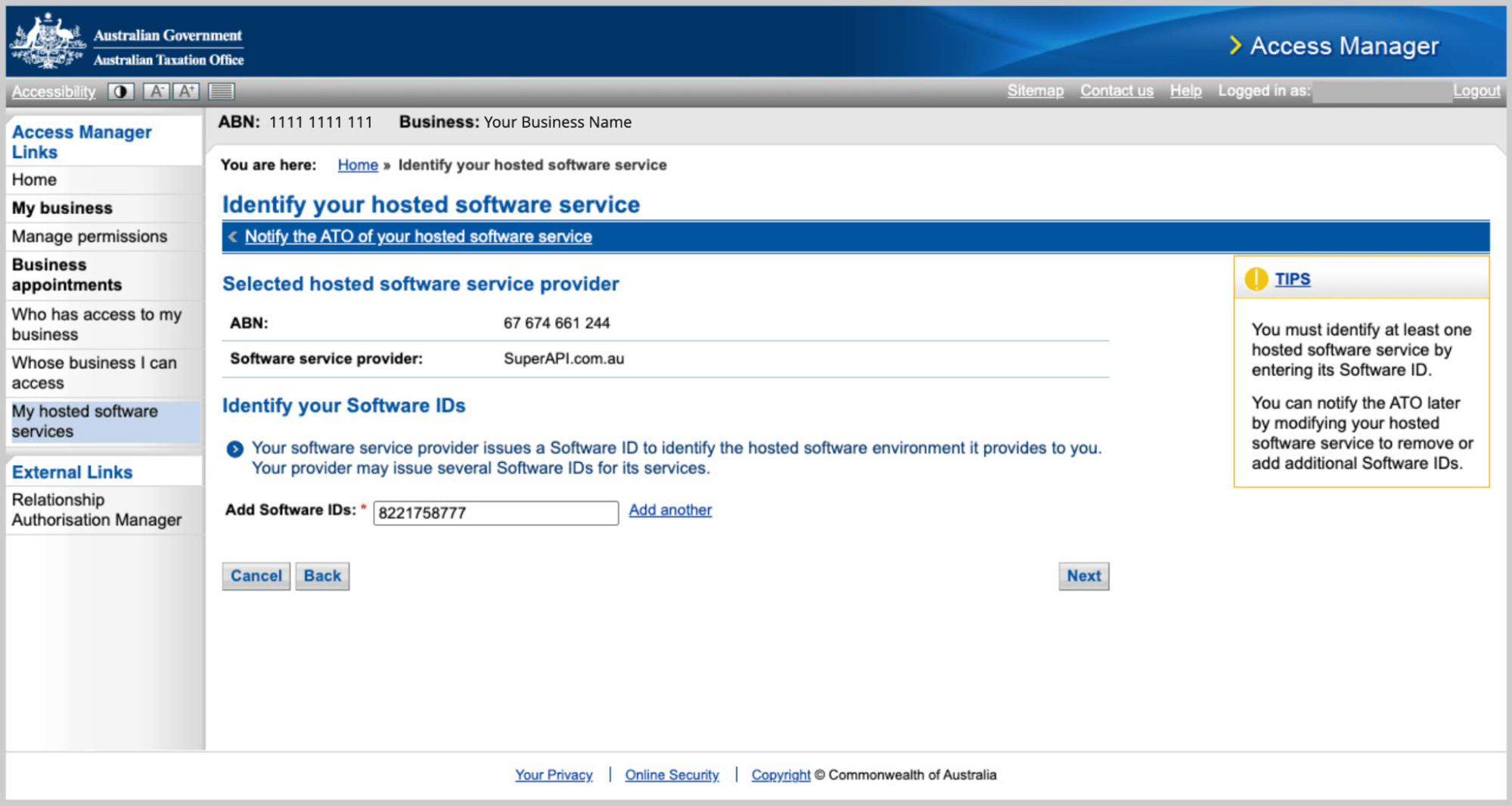
First and foremost, confirm that the software provider details have been entered correctly in the ATO Access Manager portal. The following provider details should be present under My hosted software services:
- Provider name: SuperAPI.com.au
- Provider ABN: 67 674 661 244
- Software ID (SSID): 8221758777
First-time employers or no STP events
If the business entity is a first-time employer, and has not yet filed any STP events, they may not be able to access the ATO’s stapling service.
Alternatively, if the business had a recent change in structure, resulting in an ABN change, and has not filed any STP events under the new entity, they may also be unable to access the stapling service due to the same reason.
Employers can gain access to the stapling service by calling the ATO and requesting their access to the service be granted. We are aware of cases where adding a PAYG withholding start date resolves this.
Questions to ask: Is the business brand new? Did the business go through a recent restructure? Has the business filed any STP events under their current ABN?
Check if the business can access stapling manually
Another reason the connection could be unsuccessful is if the business is blocked from accessing the stapling service.
Businesses, or agents, can access the stapling service manually via ATO Online Services.
They can do this by logging in to the ATO Online Services portal, accessing the business entity and navigating to Employees, then Employee super accounts.
If the page returns Access Denied, this indicates the business entity is blocked from performing stapling requests. This could be due to a number of reasons:
- If the business is a first-time employer and hasn’t filed an STP pay event including any employees yet.
- If the ATO has flagged the business for suspicious activity, such as a compromised TFN.
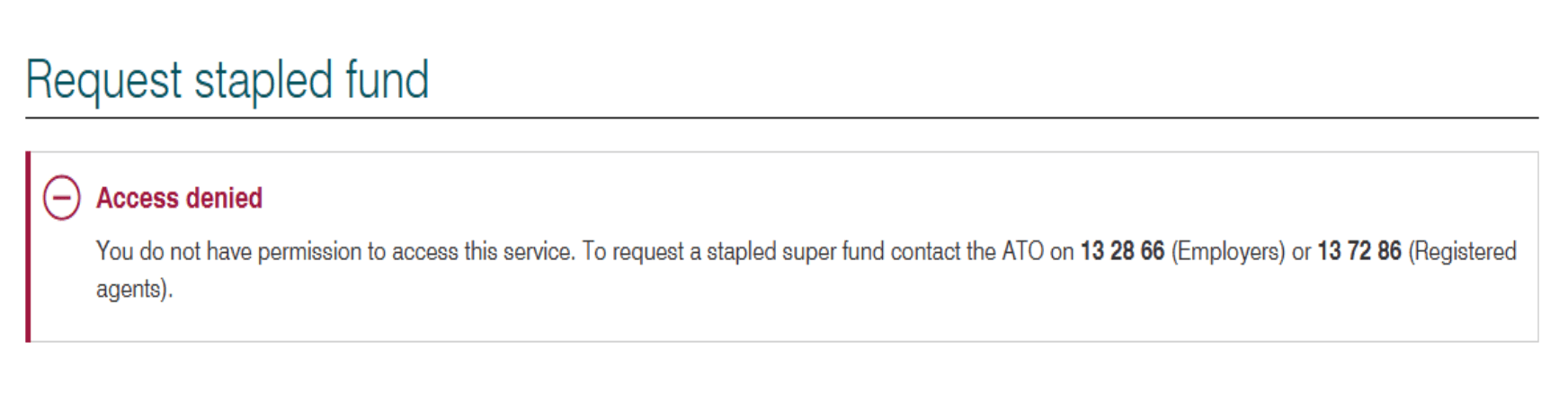
In either case, the employer, or agent, will need to contact the ATO by phone to find out more information and to request their access is reinstated:
- 13 28 66 (Employers)
- 13 72 86 (Registered agents)
Questions to ask: Can you access the super stapling service manually? You can check by logging into ATO Online Services, go to Employees, then go to Employee super accounts. What do you see here?
Check ATO status page
Check the ATO status page. We're aware of cases where the initial connection will fail if there is a current outage with the ATO Online Services portal. In this case, we'd recommend trying to check the connection again once the system is back online.
Troubleshooting - BAS & Tax Agent only
When a BAS or Tax agent has tried to establish the connection using their agent details, the connection could fail due to a number of reasons.
Ensure agent<>client link exists
For the ATO connection to be successful, the client should be associated with the agent and the agent's details. This association is formed through the agent<>client link.
Question to ask: Ask the agent to confirm the agent and client link has been correctly set up. The agent can review whether the link exists through the Online Services for agents portal, under Client list.
Useful questions to ask: Is the business listed under your client list, in your Online Services for agents portal?
Useful troubleshooting: If the client does not appear under their client list, however, they had previously been set up as a client, there could be a number of reasons for this. They can use this guide to continue troubleshooting.*
BAS or Tax agent was added to clients Access Manager
It is possible the BAS or Tax agent was invited into the businesses (their client) Access Manager portal directly, instead of being set up through the agent<>client link method.
This can be easily determined by asking the BAS or Tax agent to provide a screenshot that reflects the software provider details added in the relevant Access Manager portal.
If the Business Name (highlighted in the screenshot below) is of the client, that indicates the BAS or Tax agent was added directly into the clients ATO portal.
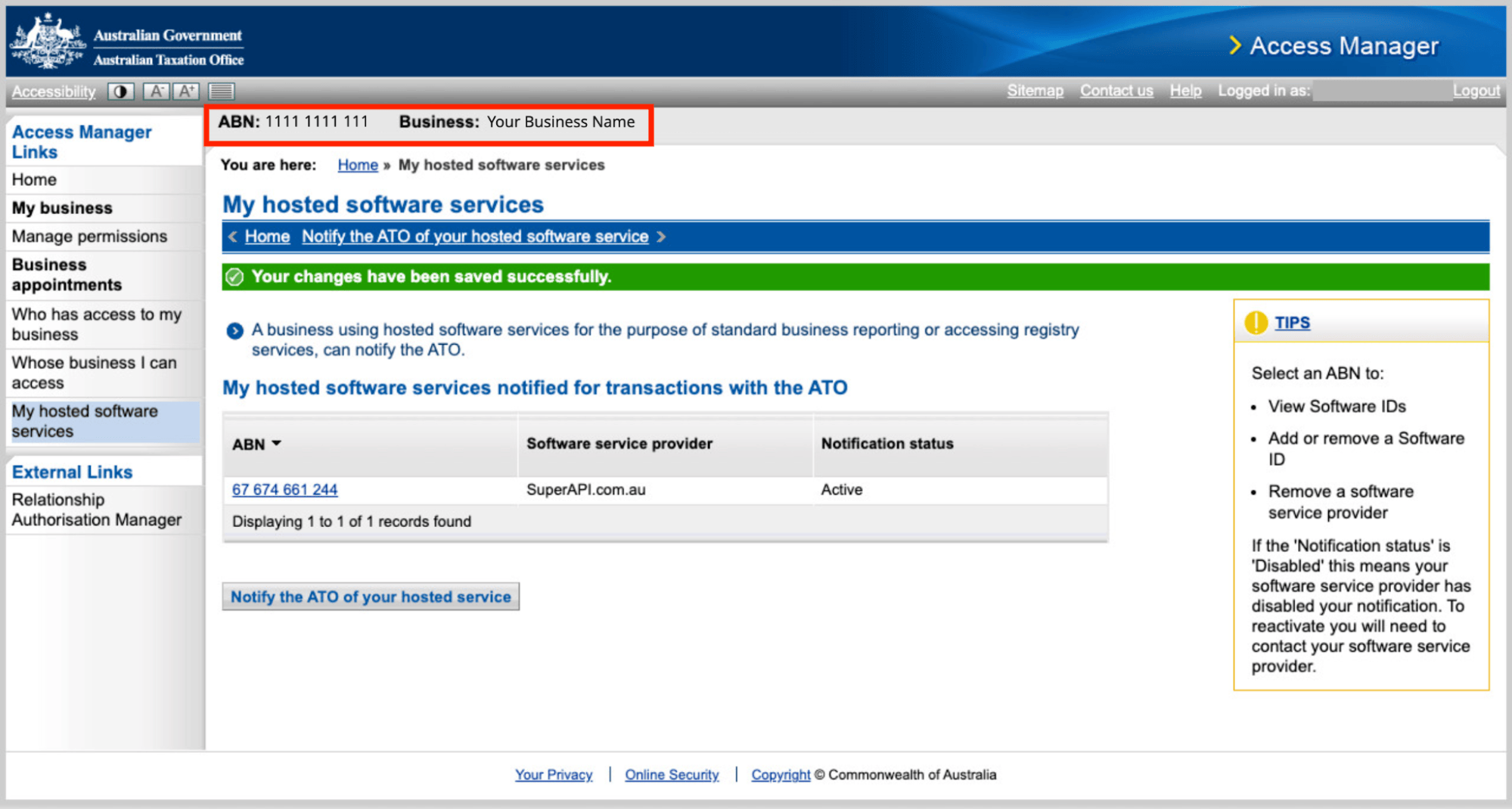
If this is the case, they have two options to remedy the situation:
- In the SuperAPI employer embed, try to set up the connection using the “Business Owner/Employer” role instead. This option will not require agent details and, since the SSID has already been added on the businesses ATO portal, the connection will be successful.
- Alternatively, you can advise the agent to set up the link to the client and then try establishing the connection again using their agent details.
Useful question to ask: What is the Business Name in the Access Manager portal where you had entered the SSID?
BAS or Tax agent adding the SSID to the incorrect entity
The BAS or Tax agent should add the software provider details in Access Manager, to the entity that holds their Registered Agent Number (RAN) or Tax Agent Number (TAN). If they are associated with multiple entities, it is possible they have entered the provider details to the wrong entity, resulting in a failed connection.
Useful question to ask: Ask the agent to verify that the entity they have entered the SSID for is associated with their agent number. They could check this by going into Online Services for Businesses > My Practice > Agent Type > Agent Number to review this.