

Tax details
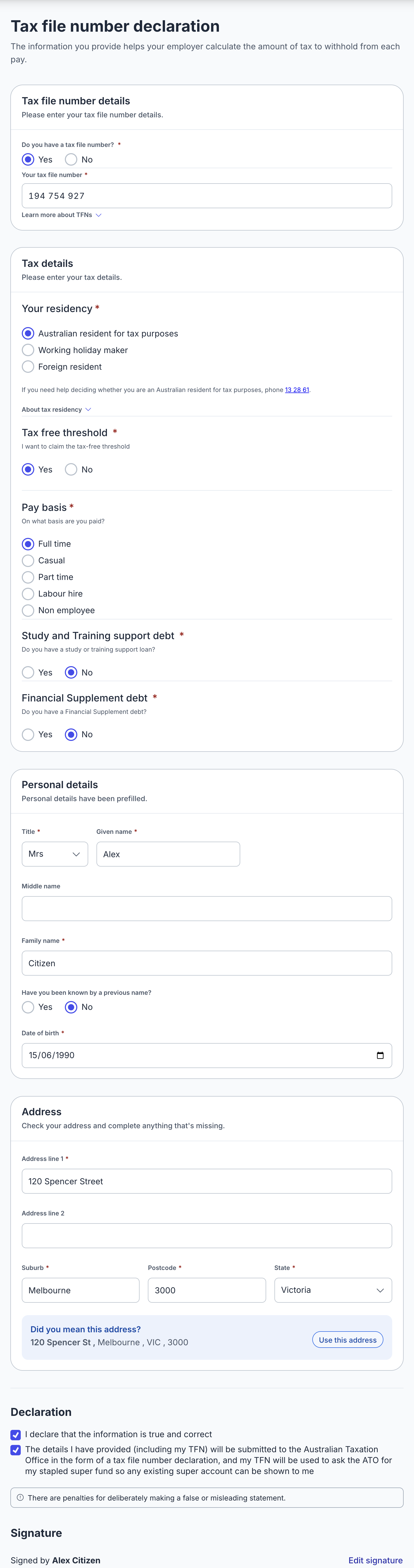
Replace paper TFN declaration forms with a guided digital experience that reduces errors and employee confusion. When ATO integration is enabled, the completed declaration is submitted automatically, removing manual processing entirely.
Features
- Carefully designed form with clear guidance on residency status, tax-free threshold and TFN entry to minimise confusion.
- Name, date of birth and address are pre-filled from the Identity and Contact details modules.
- Data is encrypted at rest and never leaves Australian borders.
What happens after submission
- When ATO integration has been configured, the completed declaration is lodged with the ATO through Standard Business Reporting (SBR2). This meets the employer's obligation to give the declaration to the ATO, so it doesn't need to be sent separately.
- A successful lodgement automatically triggers a stapled super fund request, so the Superannuation choice module can show the employee's existing fund.
- PDFs of the completed declaration are generated for the employer's records, in both the current NAT 74911 form and the older NAT 3092 form.
- The onboarding session returns
tfn_declarationwith the declaration details and links to the generated PDFs.
Validation rules
The fields that make up a TFN declaration and the rules between them are documented in the TFN declaration validation rules reference.
Need to submit a declaration without the employee going through this module? See Submit a TFN declaration without the tax details module.
Coming soon
- EmployerTick integration to validate the TFN with the ATO.